For your family’s TV
Your family’s approved shows in one click.
Skip the algorithm. Keep the content.
You hand-pick the shows. Bramble opens straight onto a grid of just what you picked — one click, onto the show page. No home screen to wander, no algorithm steering your child to anything else.
Get it on Google TVAlso on Fire TV and Windows
Google TV needs Android 11 or newer; Fire TV needs Fire OS 6 or newer; Windows needs 10 or 11.
Build your list on an Android phone: Bramble for Parents
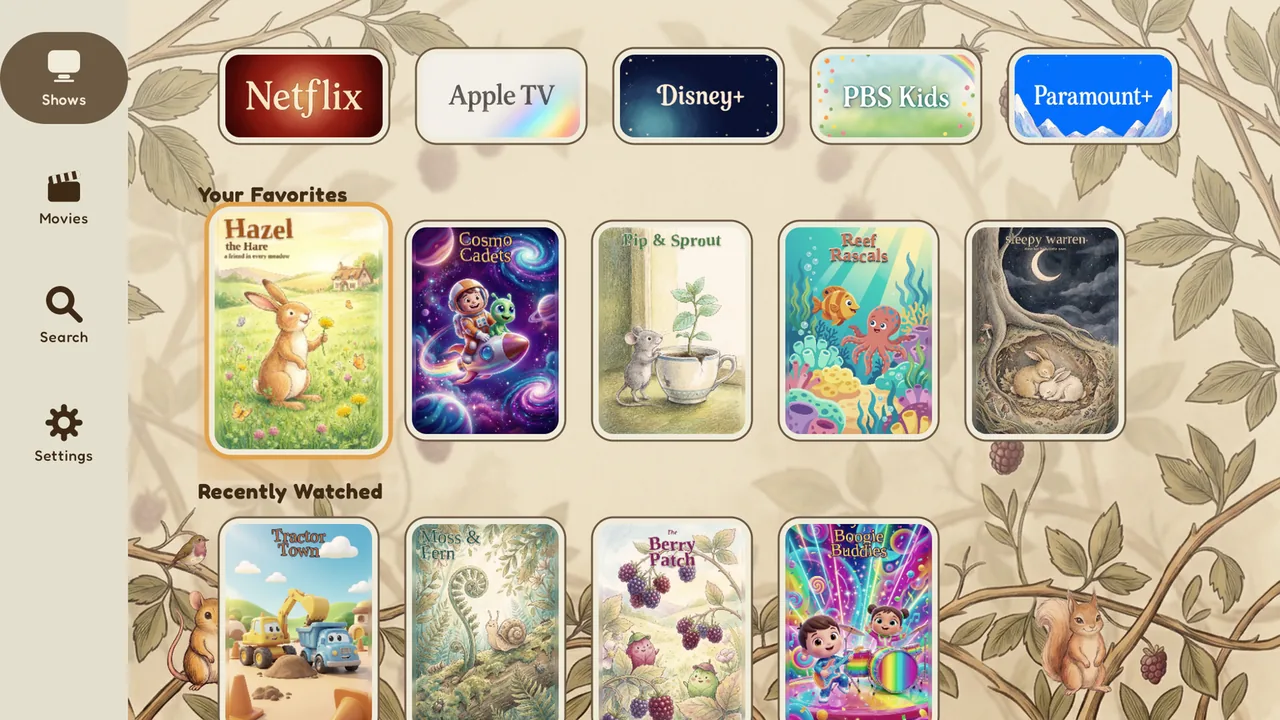
You know the moment.
A streaming app opens onto a wall of recommendations, a child starts asking for whatever is brightest, and a few minutes later they are somewhere nobody chose. Those apps are built to keep going. Bramble isn’t.
It’s just the shows you picked.
One grid — the posters you approved, in the order you set. Press one, and the real streaming app opens right on that show (on a computer, the service’s own page in a Bramble window). That’s the whole thing.
You choose what's on it.
Only the shows you hand-picked appear. Nothing else can.
It opens straight into the show.
One press opens the real app right on that show (on a computer, the service's own page in a Bramble window). No browsing, no rabbit hole.
Your services on one grid.
The shows you already pay for, in a single place — no hunting through separate apps.
Works with what you already pay for
- Disney+
- Netflix
- Apple TV
- PBS Kids
- Paramount+
- Prime Video
- Hulu
Bramble streams nothing of its own. You bring the subscriptions you already have; it just opens them on the right show.
Bramble isn’t affiliated with any of these services.
From $3.99 a month, free to start.
- No child accounts
- No tracking
- No ads, ever
- You're never the product